Designing a game-changing ultrasound solution for blood clot detection

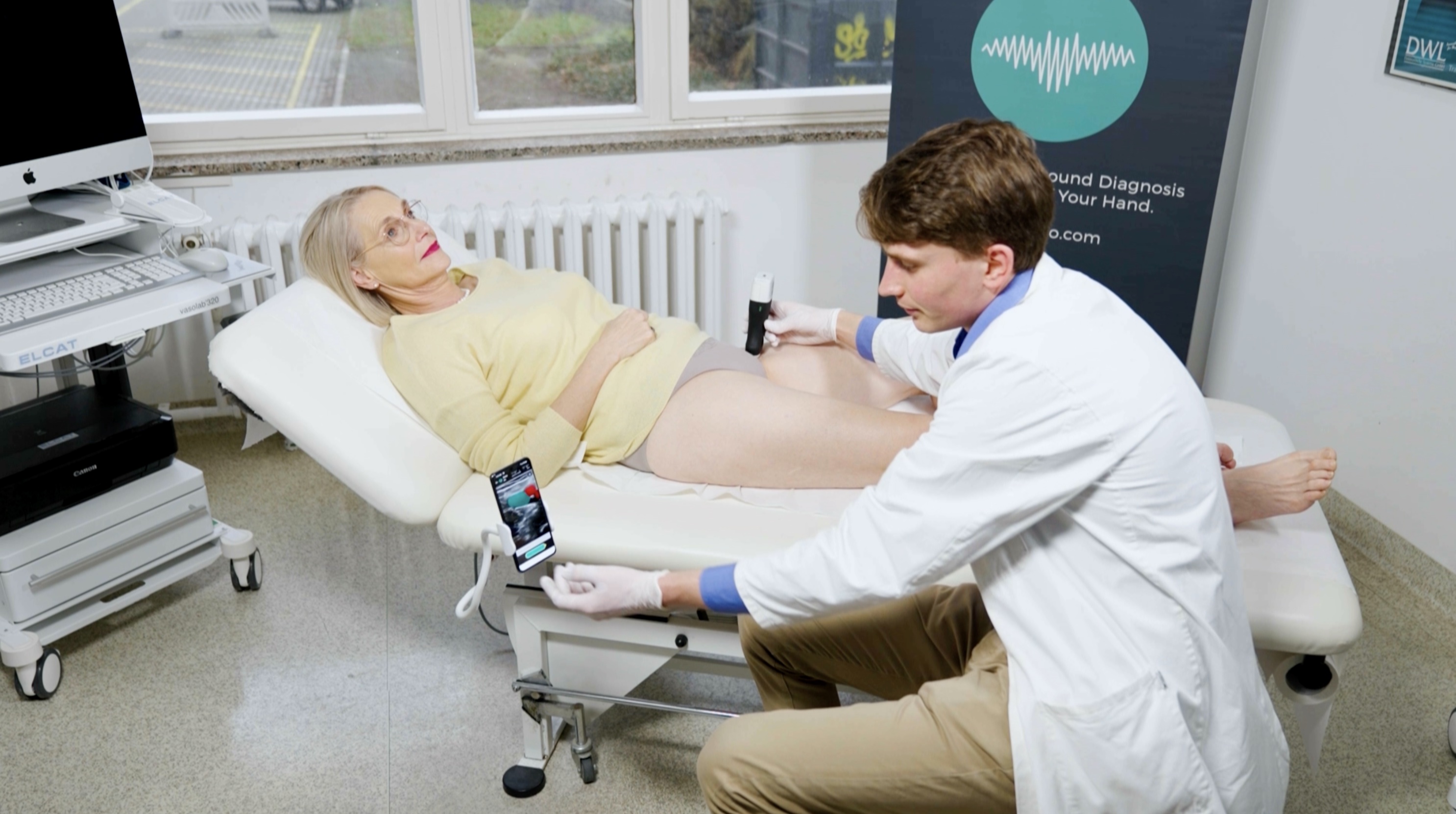
AutoDVT is an ultrasound solution that uses artificial intelligence to guide non-ultrasound experts, such as nurses, in performing a DVT exam to detect blood clots.

Project type

Android & web app

Timeline

Jul 21 – Feb 22

Role

Founding designer

Company

ThinkSono

CONTEXT

Launching a beta release for clinical trials

I was tasked to design the company's first product, AutoDVT, an innovative ultrasound solution that aims to transform the detection of DVT (a blood clot) by providing AI-powered guidance for non-experts, such as nurses, to conduct the exam without formal training.  AutoDVT is set to reduce costs, increase efficiency, and improve mobility, all of which will result in improved patient care.
The impact

This project was successfully designed and developed on time despite an ambitious deadline. We achieved a significant milestone by completing the core flows to roll out a beta release to begin clinical trials. So far, the software has been deployed in 7 hospitals in Europe.

Memo is a superb UX and UI designer. He gains a sound understanding of the product and business goals and scope, asks the right and critical questions and requires little to no guidance to come up with a fitting solution for any given problem..."

Read More

Sven Mischkewitz

Co-founder, thinksonO

What is DVT

The leading cause of preventable
hospital deaths in the US

Deep vein thrombosis (DVT) is a blood clot that forms in the deep veins of the legs. If parts of the clot break off, it could travel to the lungs and cause a potentially deadly disease called pulmonary embolism (PE).

900k

Patients are affected

100k

People die

$10B

Cost to treat DVT

Annual U.S. stats | Source: rb.gy/fzydze

The problem

Inefficiencies with the existing diagnostic pathway

Compression ultrasound has proven to be an accurate and non-invasive modality for recognizing DVT. During the exam, a radiologist will apply pressure to the veins in the affected area using an ultrasound probe. If the vein cannot compress, it's indicative of a blood clot.

However, a worldwide shortage of radiologists limits healthcare systems from diagnosing and treating DVT efficiently. As a result, patients often wait hours for test results due to the limited capacity of radiologists, making the treatment expensive, time-consuming, and only sometimes possible.

Simplifying the number of steps and reducing the cost to get a DVT diagnosis.

≈ 5 min / $70
≈ 6 - 24 hrs /

Other benefits

Enables healthcare professionals to perform (DVT) scans at the point of care.

Suspected DVT patients will no longer be medicated before a diagnosis.

AutoDVT will help the Radiologist shortage in the US.

The solution

Empowering non-experts with AI guidance to scan key anatomy

Today, exams are done exclusively by radiologists or medical staff with extensive training limiting the number of individuals who can perform the exam. AutoDVT's seamless AI guidance empowers non-experts by highlighting the veins of interest and providing step-by-step instructions to capture the correct data in the proper sequence, increasing the supply of staff who can perform the exam.

Here's how it works.

Finding the veins

With AI-powered written instructions, chimes, overlays, and other feedback, the app guides the user to correctly position and move the probe to find the vessels of interest.

Recording the compression

After finding the vessels, a 10-second recording of the vessels' compression is captured to be sent to the radiologist for a final diagnosis.

If the veins compress fully, it indicates no DVT.

Reviewing the scan recording

After recording the compression, the user reviews the clip and records whether the veins are compressed for a provisional assessment.

Radiologist's diagnosis

The provisional diagnosis is sent to the cloud dashboard for review, where a radiologist can log in remotely and make a final diagnosis.

Design PROCESS

Opening up the design process

The UX process for this project had 5 key phases that focused on cross-functional collaboration and emphasized shared understanding so that everyone on the team had the same mental model of the problem space.

UX FLOwchart
Validating the flow and concept early

I mapped out a UX flowchart to validate the flow and concept early with minimum time invested, it was important for deliverables to be lightweight with a high impact.

The UX flowchart allowed us to get a quick collective overview of the entire process and allowed us to scope and prioritize the project. After a few iterations, we all agreed on the features the beta release would support and moved forward to implement our plan.

wireframes
Designing the core
experience first

With a solid understanding and team consensus on project scope and flow, I explored different scanning screen concepts before mocking the rest of the experience. I focused on the scanning screen because it is the app's core experience, and the rest of the content and navigation could be designed around it.

v1
v2
v3
v4 chosen solution
Mid-fidelity scanning screen exploration
Refining the core screens

After the initial screen design concepts, it became evident that filling all the functionality we contemplated into a single screen was challenging and likely to decrease the learnability of the app. Therefore, I split the content into two screens to make the tasks easier to accomplish and scanning more straightforward.

Final exam PROT screen
Final scan screen
Wireflow
A holistic visual representation of the user flow

With ironed-out key screens, I mapped out a mid-fidelity wireflow to document the entire experience by combining wireframes and flowcharts to show complete views, paths, and interactions between screens.

Wireflows allowed us to have a common understanding of the product structure, supported me in gathering stakeholder feedback, and facilitated design discussions. As a result, Wireflows became an essential living document and were heavily referenced by the engineering team during implementation.

User Testing
Evaluating the design at the different stages

I tested at different stages of the design process. For example, I sometimes tested early to validate or invalidate assumptions before spending engineering time and resources. Still, at other times I would test before a release roll-out to see if specific elements or flows needed improvements. The approach was a mixed bag. It ranged from guerrilla-style testing to more formal in-person testing with relevant participants in the medical space.

We also observed real users interact with the actual product and gather key qualitative insights during clinical trial training sessions with nurses.

Design Library & handoff
Creating a visual language

I created a design library to organize UI components into a single source of truth file to achieve uniformity, speed, and a smoother design handoff. It includes logos, color palette, 60+ UI components, icons, surfaces, typography and stroke styles.

Outcomes

Delivered design on time despite tight deadline

The biggest constraint for the project time because there were commitments with hospitals to begin clinical trials. However, I successfully designed, tested, and handed off the design on time.

AutoDVT in 11 hospitals across Europe

AutoDVT is already live in 7 hospitals in the UK and in discussions to be implemented in further hospitals across Europe, Canada and the United States.

Favorable preliminary results

Preliminary results indicate AutoDVT to be 30x faster than the existing clinical pathway without sacrificing accuracy.

Established a relationship with ThinkSono

Through my work and collaboration, I gained the team's trust, which led to additional work, such as researching the feasibility of future applications, designing the company's marketing website, and designing the reviewer's android mobile app.

Watch AutoDVT in action
Watch Autodvt in Action.
Thanks for scrolling.

I'm open to UX design opportunities.

Get in touch